
InstaTV2015070101 - Get APK
You'll be able to download in few seconds.
Publisher Description
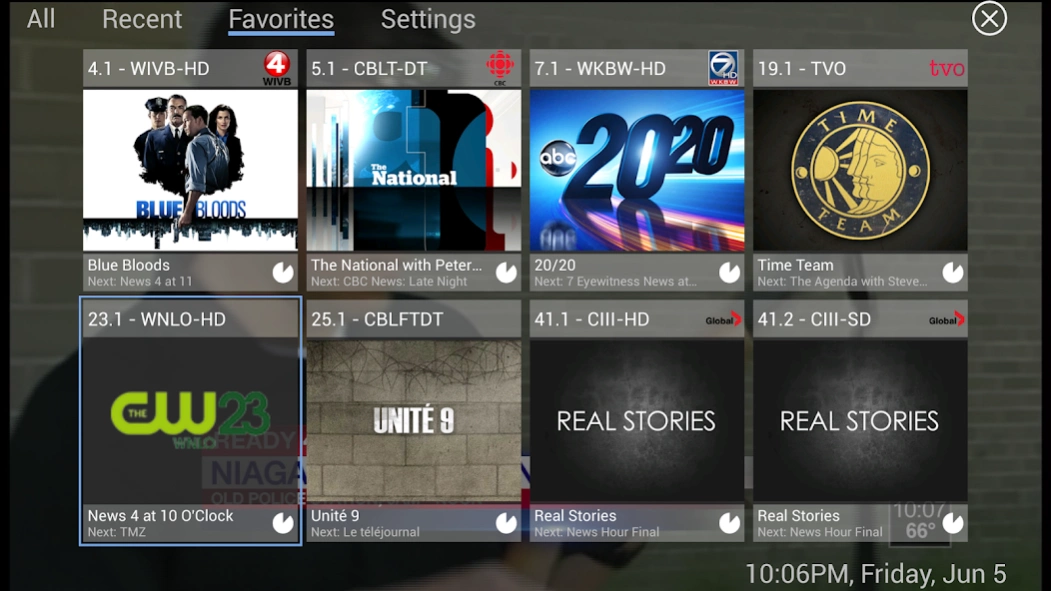
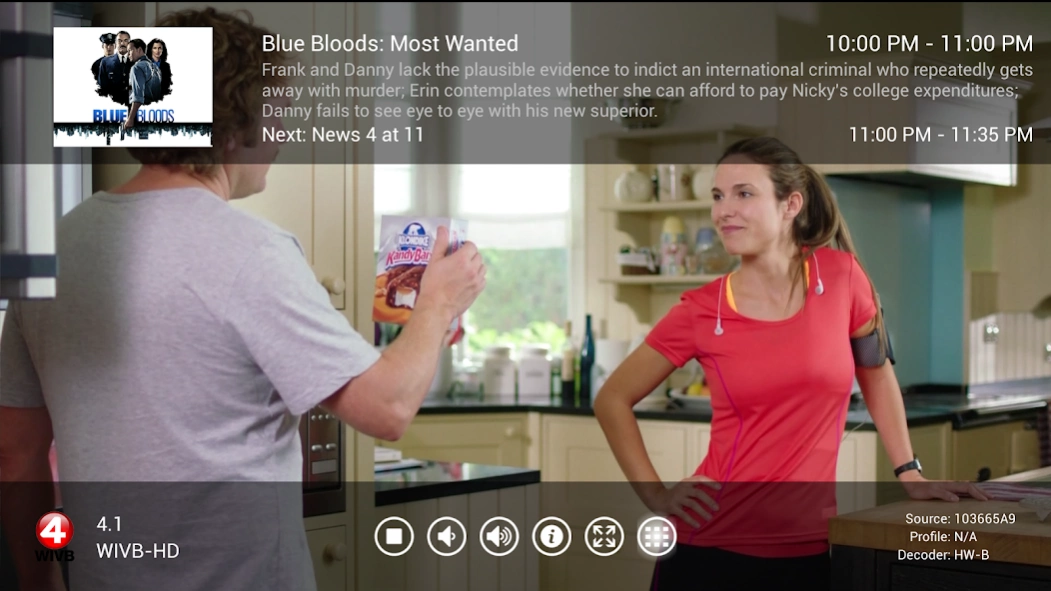
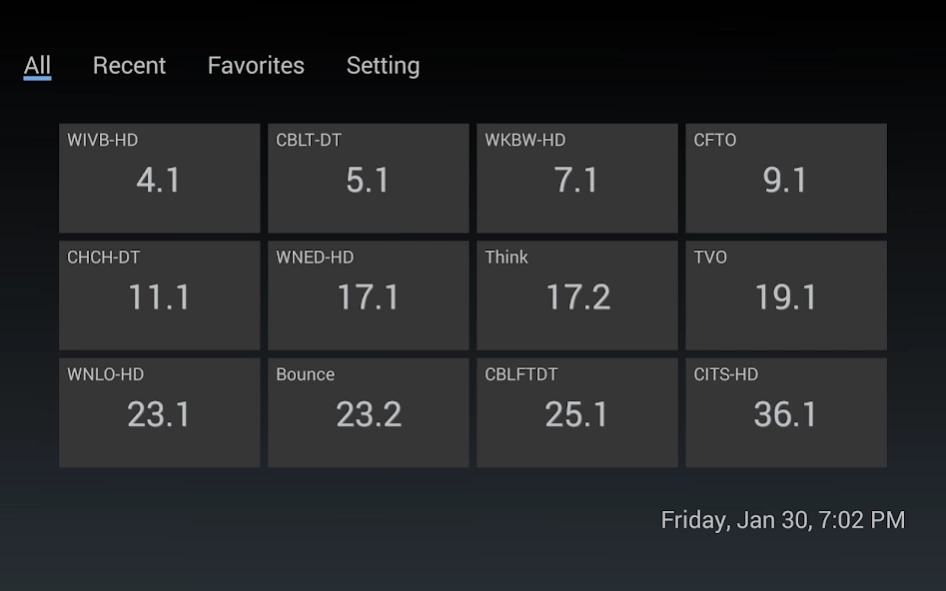

Stream live TV from HDHomeRun to Android Tablet/Phone/TV devices
Stream live TV from HDHomeRun to Android Tablet/Phone/TV devices
Features:
- Supports all HDHomeRun models, including legacy models (HDHR3-US, HDHR2-US, HDHR3-EU)
- Supports TV Guide on selected countries with HDHomeRun DLNA models (Connect, Extend, and DVB-T2)
- Full Hardware MPEG2 & H264 decoder on Android Media Player based on RockChip/AMLogic/AllWinner SOCs
- Full Hardware MPEG2 & H264 decoder on Kindle FireTV Box
- Full Hardware H264 decoding for most Android devices when a HDHomeRun Extended is used
- High performance software decoder for devices without Hardware decoder. HD SW decoding requires Nvidia Tegra 4+/Qualcomm Snapdragon 600+/Intel Atom 3xxx+
- Channel grid as an overlay for fast and easier channel surfing.
- Full Gesture/Keyboard/Remote Control/Gamepad navigation support.
- Automatically sync favorite channels from HDHomeRun device
Supported HDHomeRun models:
- HDHomeRun DUAL US&CA(HDHR3-US & HDHR2-US)
- HDHomeRun DUAL EU (HDHR3-EU)
- HDHomeRun PRIME (HDHR3-CC)
- HDHomeRun EXTEND (HDTC-2US)
- HDHomeRun CONNECT (HDHR4-2US)
- HDHomeRun 4DC (HDHR3-4DC)
Note:
- Use "Type A" decoder to enable MPEG2 & H.264 Hardware decoding for most Android Media Box/Stick devices using RockChip/AMLogic/AllWinner SOCs. No HDHomeRun Extended required.
- Not all video/audio codecs are supported and In-App Purchase may be required.
- HD video Software Decoding requires Nvidia Tegra 4+/Qualcomm Snapdragon 600+/Intel Atom 3xxx+/Rockchip RK3288+
- HD video may also require a WIFI AC or WIFI N running on 5Ghz. A wired network is recommended.
- Only SD video is supported on slower devices with WiFi G Wireless.
- Tegra2 devices are not supported (Moto Xoom, Asus Transformer 1, etc)
Please visit http://instatv.org for more information
About InstaTV
The company that develops InstaTV is KeYi Tech Inc.. The latest version released by its developer is 2015070101.
To install InstaTV on your Android device, just click the green Continue To App button above to start the installation process. The app is listed on our website since 2015-07-01 and was downloaded 0 times. We have already checked if the download link is safe, however for your own protection we recommend that you scan the downloaded app with your antivirus. Your antivirus may detect the InstaTV as malware as malware if the download link to com.keyitech.instatv.pro is broken.
How to install InstaTV on your Android device:
- Click on the Continue To App button on our website. This will redirect you to Google Play.
- Once the InstaTV is shown in the Google Play listing of your Android device, you can start its download and installation. Tap on the Install button located below the search bar and to the right of the app icon.
- A pop-up window with the permissions required by InstaTV will be shown. Click on Accept to continue the process.
- InstaTV will be downloaded onto your device, displaying a progress. Once the download completes, the installation will start and you'll get a notification after the installation is finished.
Program Details
System requirements
Download information
Pricing
Version History
version 2015070101
posted on 2015-07-02
Release 20150701:
- New: App renamed to just "InstaTV"
- New: TV Guide support with HDHR3-CC, HDHR4-*, HDTC-*.
- New: Channel grid shows current program image, title, and progress (as a pie chart)
- New: Improved overlay to show program details
- New: Android TV Live Channel with guide support (Nexus Player, ADT-1, Nvidia Shield TV, and Forge TV)
- New: Automaticaly show guide overlay to notify the start of next program
See website for details.
version 2.0.2
posted on 2013-06-22
Several fixes and updates
Disclaimer
External Download
We do not host InstaTV on our servers. We did not scan it for viruses, adware, spyware or other type of malware. This app is hosted by Galad and passed their terms and conditions to be listed there. We recommend caution when installing it.
The APK Download link for InstaTV is provided to you by apps112.com without any warranties, representations or guarantees of any kind, so access it at your own risk.
If you have questions regarding this particular app contact the publisher directly. For questions about the functionalities of apps112.com contact us.
